


外部 JSON-2 API
19.0 新版功能.
Odoo 通常通过模块进行内部扩展,但它的许多功能和所有数据也可以在外部进行分析或与各种其他软件集成。 型号 API 的一部分可以通过 HTTP 的“/json/2”端点轻松获得。
小技巧
可用的实际模型、字段和方法特定于每个数据库,可以在其“/doc”页面上查阅。
注解
仅*自定义* Odoo 定价计划可通过外部 API 访问数据。 One App Free 或 Standard 计划无法访问外部 API。如需了解更多信息,请访问 Odoo pricing page 或联系您的客户成功经理。
应用程序编程接口
要求
在“/json/2/<model>/<method>” URL 处发布 JSON 对象。
HTTP 标头
- 主持人
必需,服务器的主机名。
- 授权
必需,
bearer后跟 API key。- 内容类型
必填,
application/json,建议使用字符集。- X-Odoo-数据库
可选,要连接的数据库的名称。
- 用户代理
推荐,您的软件的名称。
网址路径
- 模型
必填,技术型号名称。
- 方法
必需,要执行的方法。
正文 JSON 对象
- id
要在其上执行方法的记录 ID 数组。调用``@api.model``修饰的方法时为空或省略。
- 语境
可选,附加值的对象。例如``{“lang”: “en_US”}``。
- 参数
根据需要多次使用该方法的参数。
Example
POST /json/2/res.partner/search_read HTTP/1.1
Host: mycompany.example.com
X-Odoo-Database: mycompany
Authorization: bearer 6578616d706c65206a736f6e20617069206b6579
Content-Type: application/json; charset=utf-8
User-Agent: mysoftware python-requests/2.25.1

{
    "context": {
        "lang": "en_US"
    },
    "domain": [
        ["name", "ilike", "%deco%"],
        ["is_company", "=", true]
    ],
    "fields": ["name"]
}
回复
如果 成功,则为 200 状态,并在正文中包含被调用方法的 JSON 序列化返回值。
Example
HTTP/1.1 200 OK
Content-Type: application/json; charset=utf-8

[
   {"id": 25, "name": "Deco Addict"}
]
如果出现 错误,则为 4xx/5xx 状态,并在正文中包含 JSON 序列化错误对象。
- 姓名
发生的 Python 异常的完全限定名称。
- 信息
异常消息,通常与`arguments[0]`相同。
- 论据
所有异常参数。
- 语境
请求使用的上下文。
- 调试
异常回溯,用于调试目的。
Example
HTTP/1.1 401 Unauthorized
Content-Type: application/json; charset=utf-8

{
  "name": "werkzeug.exceptions.Unauthorized",
  "message": "Invalid apikey",
  "arguments": ["Invalid apikey", 401],
  "context": {},
  "debug": "Traceback (most recent call last):\n  File \"/opt/Odoo/community/odoo/http.py\", line 2212, in _transactioning\n    return service_model.retrying(func, env=self.env)\n  File \"/opt/Odoo/community/odoo/service/model.py\", line 176, in retrying\n    result = func()\n  File \"/opt/Odoo/community/odoo/http.py\", line 2177, in _serve_ir_http\n    self.registry['ir.http']._authenticate(rule.endpoint)\n  File \"/opt/Odoo/community/odoo/addons/base/models/ir_http.py\", line 274, in _authenticate\n    cls._authenticate_explicit(auth)\n  File \"/opt/Odoo/community/odoo/addons/base/models/ir_http.py\", line 283, in _authenticate_explicit\n    getattr(cls, f'_auth_method_{auth}')()\n  File \"/opt/Odoo/community/odoo/addons/base/models/ir_http.py\", line 240, in _auth_method_bearer\n    raise werkzeug.exceptions.Unauthorized(\nwerkzeug.exceptions.Unauthorized: 401 Unauthorized: Invalid apikey\n"
}
Traceback (most recent call last):
  File "/opt/Odoo/community/odoo/http.py", line 2212, in _transactioning
    return service_model.retrying(func, env=self.env)
  File "/opt/Odoo/community/odoo/service/model.py", line 176, in retrying
    result = func()
  File "/opt/Odoo/community/odoo/http.py", line 2177, in _serve_ir_http
    self.registry['ir.http']._authenticate(rule.endpoint)
  File "/opt/Odoo/community/odoo/addons/base/models/ir_http.py", line 274, in _authenticate
    cls._authenticate_explicit(auth)
  File "/opt/Odoo/community/odoo/addons/base/models/ir_http.py", line 283, in _authenticate_explicit
    getattr(cls, f'_auth_method_{auth}')()
  File "/opt/Odoo/community/odoo/addons/base/models/ir_http.py", line 240, in _auth_method_bearer
    raise werkzeug.exceptions.Unauthorized(
werkzeug.exceptions.Unauthorized: 401 Unauthorized: Invalid apikey
配置
API 密钥
手动生成密钥
API 密钥必须在“Authorization”请求标头中设置为不记名令牌。
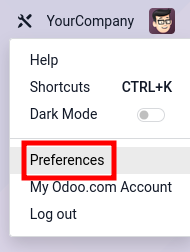
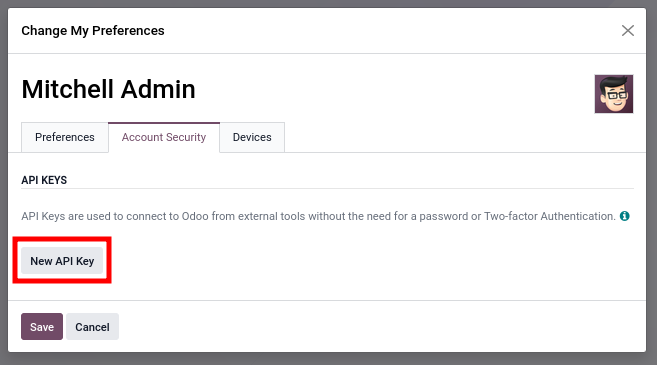
通过 为用户创建新的 API 密钥。
|
|
|
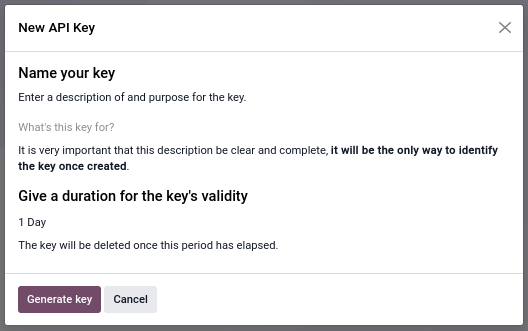
创建新的 API 密钥需要描述和持续时间。该描述使得可以识别该密钥,并随后确定该密钥是否仍在使用或应该被移除。持续时间决定了密钥的生命周期,之后密钥将失效。建议设置较短的持续时间(通常为一天)以进行交互使用。出于安全原因,不可能创建有效期超过三个月的密钥。这意味着持久钥匙必须至少每三个月轮换一次。
Generate Key 按钮创建一个强大的 160 位随机密钥。键值在创建时只显示一次,以后无法检索。立即复制密钥并安全保存。如果密钥被泄露或丢失,请立即将其删除并生成新密钥。
有关 API 密钥管理的进一步指导,请参阅 OWASP’s Secrets Management Cheat Sheet。
程序化密钥管理
Odoo 提供 RPC 方法以编程方式生成和撤销 API 密钥。
先决条件
默认情况下,编程式 API 密钥管理仅限于具有“设置”管理访问权限的用户。
要允许其他用户以编程方式管理 API 密钥,请导航到 并设置参数“base.enable_programmatic_api_keys` to ``True`”。
密钥生成
API 密钥可以使用 res.users.apikeys.generate() 生成。
该方法接受以下参数:
``key``(字符串):现有的有效 API 密钥
scope(string ornull):分配给新键的范围``name``(字符串):人类可读的标签
expiration_date(string): the expiration date formatted as ISO 8601 (e.g."2026-05-19")
范围限制了 API 密钥的使用范围。
rpc scope is the generic scope used for RPC access through controllers with auth='bearer'。
新密钥通常应使用与现有密钥相同的范围。但是,在需要时可以从无作用域键创建有作用域键。无作用域键在 Python 中使用 null as their scope value (None)。
过期日期根据分配给用户的角色允许的最大 API 密钥持续时间进行验证。
对于高权限或外部暴露的集成使用较短的过期期限,而仅对于严格控制的内部系统使用较长的期限。
Example
import requests

API_KEY = ...  # get it from a secure location

res_apikey = requests.post(
    f"https://mycompany.example.com/json/2/res.users.apikeys/generate",
    headers={"Authorization": f"bearer {API_KEY}"},
    json={
        "key": API_KEY,
        "scope": None,
        "name": "Some service",
        "expiration_date": "2026-05-19",
    },
)
res_apikey.raise_for_status()
new_apikey = res_apikey.json()

# store the new key securely
(async () => {
    const API_KEY = ;  // get it from a secure location
    const headers = {
        "Content-Type": "application/json",
        "Authorization": "bearer " + API_KEY,
    }

    const reqSearch = {
        method: "POST",
        headers: headers,
        body: JSON.stringify({
            "key": API_KEY,
            "scope": null,
            "name": "Some service",
            "expiration_date": "2026-05-19",
        }),
    };
    const resSearch = await fetch("https://mycompany.example.com/json/2/res.users.apikeys/generate", reqSearch);
    if (!resSearch.ok) throw new Error(resSearch.json());
    const new_apikey = await resSearch.json();

    // store the new key securely
})();
set -eu

API_KEY=

curl https://mycompany.example.com/json/2/res.users.apikeys/generate \
    -X POST \
    --oauth2-bearer $API_KEY \
    -H "Content-Type: application/json" \
    -d '{
        "key": "'"$API_KEY"'",
        "scope": null,
        "name": "Some service",
        "expiration_date": "2026-05-19"
    }' \
    --silent \
    --fail

# store the new key securely
该方法以字符串形式返回新生成的 API 密钥,否则无法检索该密钥。
默认情况下,用户可以通过编程方式生成最多 10 个 API 密钥。该限制可以使用系统参数“base.programmatic_api_keys_limit”进行配置。
尝试超出配置的限制失败,并显示 HTTP 422 Unprocessable Content 状态代码。
密钥撤销
可以使用 res.users.apikeys.revoke() 撤销 API 密钥。
该方法接受以下参数:
``key``(字符串):要撤销的 API 密钥
Example
import requests

API_KEY = ...  # get it from a secure location

res_apikey = requests.post(
    f"https://mycompany.example.com/json/2/res.users.apikeys/revoke",
    headers={"Authorization": f"bearer {API_KEY}"},
    json={
        "key": API_KEY,
    },
)
res_apikey.raise_for_status()
(async () => {
    const API_KEY = ;  // get it from a secure location
    const headers = {
        "Content-Type": "application/json",
        "Authorization": "bearer " + API_KEY,
    }

    const reqSearch = {
        method: "POST",
        headers: headers,
        body: JSON.stringify({
            "key": API_KEY,
        }),
    };
    const resSearch = await fetch("https://mycompany.example.com/json/2/res.users.apikeys/revoke", reqSearch);
    if (!resSearch.ok) throw new Error(resSearch.json());
})();
set -eu

API_KEY=

curl https://mycompany.example.com/json/2/res.users.apikeys/revoke \
    -X POST \
    --oauth2-bearer $API_KEY \
    -H "Content-Type: application/json" \
    -d "{\"key\": \"$API_KEY\"}" \
    --silent \
    --fail
如果密钥有效,则会立即撤销,并且无法用于后续请求。否则,请求将失败并显示 HTTP 403 Forbidden 状态代码。
请注意,被撤销的密钥和授权标头中给出的密钥不需要匹配。轮换期间的一个好习惯是使用新密钥进行身份验证以撤销旧密钥。
密钥轮换最佳实践
如果密钥泄露,定期轮换 API 密钥可以降低未经授权访问的风险。
轮换 API 密钥时:
在撤销前一个密钥之前生成一个新密钥。
在部署之前安全地存储新密钥。
验证所有服务是否都在使用新密钥。
仅在转换完成后才撤消先前的密钥。
使用适合系统安全要求的到期日期。
优选为每个服务或集成提供专用 API 密钥,以简化审核和撤销。
访问权
JSON-2 API 使用标准 security models of Odoo。所有操作均根据用户的访问权限、记录规则和字段访问进行验证。
对于**交互式使用**,例如发现 API 或运行一次性脚本,可以使用**个人帐户**。
对于**扩展自动化使用**,例如与其他软件集成,建议创建和使用**专用机器人用户**。使用专门的机器人用户有几个好处:
可以向机器人授予所需的最低权限,从而限制 API 密钥泄露时的影响。
密码可以设置为空以禁用登录/密码身份验证,从而限制帐户被盗的可能性。
访问日志字段 使用机器人帐户。没有一个用户是非个性化的。
数据库
根据部署,“Host` and/or X-Odoo-Database request headers might be required. The Host header is required by HTTP/1.1 and is needed on servers where Odoo is installed next to other web applications, so that a web-server/reverse-proxy is able to route the request to the Odoo server. The X-Odoo-Database header is required when a single Odoo server hosts multiple databases and the 数据库过滤器 wasn’t configured to use the ``Host`”标头。
大多数 HTTP 客户端库使用连接 URL 自动设置“Host”标头。
交易
对 JSON-2 端点的所有调用都在其自己的 SQL 事务中运行。如果成功则事务被提交,如果错误则被丢弃。使用 JSON-2 API,不可能在单个事务中链接多个调用。这意味着在进行多个连续调用时必须小心谨慎,因为数据库可能会被其他并发事务修改。这在执行与预订、付款等相关的操作时尤其危险。
解决方案是始终调用在单个事务中执行所有相关操作的单个方法。这样,可以保证数据保持一致:要么一切都完成(成功,提交),要么什么都不做(错误,回滚)。
在ORM中,search_read method is an example of a single method that performs multiple operations (search then read) in a single transaction. If a concurrent request removes one of the records search retrieves, then there is a risk that subsequent calls to read fail for a missing record error. Such a problem cannot occur in search_read,因为系统保证了事务之间的适当隔离。
在业务模型中,这些方法通常以“action_`, such as sale.order’s ``action_confirm`”方法为前缀,该方法在确认销售订单之前验证其是否有效。
当一组相关操作不存在方法时,可以在专用模块中创建一个新方法。
其他资料
PostgreSQL - 事务隔离 - Repeatable Read
代码示例
以下示例展示了如何在虚拟数据库“mycompany` hosted on the dummy website ``https://mycompany.example.com`”上执行两个 common ORM methods。其 dynamic documentation 可在 https://mycompany.example.com/doc 上找到。
import requests

BASE_URL = "https://mycompany.example.com/json/2"
API_KEY = ...  # get it from a secure location
headers = {
    "Authorization": f"bearer {API_KEY}",
    "X-Odoo-Database": "mycompany",
    "User-Agent": "mysoftware " + requests.utils.default_user_agent(),
}

res_search = requests.post(
    f"{BASE_URL}/res.partner/search",
    headers=headers,
    json={
        "context": {"lang": "en_US"},
        "domain": [
            ("name", "ilike", "%deco%"),
            ("is_company", "=", True),
        ],
    },
)
res_search.raise_for_status()
ids = res_search.json()

res_read = requests.post(
    f"{BASE_URL}/res.partner/read",
    headers=headers,
    json={
        "ids": ids,
        "context": {"lang": "en_US"},
        "fields": ["name"],
    }
)
res_read.raise_for_status()
names = res_read.json()
print(names)
(async () => {
    const BASE_URL = "https://mycompany.example.com/json/2";
    const API_KEY = ;  // get it from a secure location
    const headers = {
        "Content-Type": "application/json",
        "Authorization": "bearer " + API_KEY,
        "X-Odoo-Database": DATABASE,
    }

    const reqSearch = {
        method: "POST",
        headers: headers,
        body: JSON.stringify({
            context: {lang: "en_US"},
            domain: [
                ["name", "ilike", "%deco%"],
                ["is_company", "=", true],
            ],
        }),
    };
    const resSearch = await fetch(BASE_URL + "/res.partner/search_read", reqSearch);
    if (!resSearch.ok) throw new Error(resSearch.json());
    const ids = await resSearch.json();

    const reqRead = {
        method: "POST",
        headers: headers,
        body: JSON.stringify({
            ids: ids,
            context: {lang: "en_US"},
            fields: ["name"],
        }),
    };
    const resRead = await fetch(BASE_URL + "/res.partner/search_read", reqRead);
    if (!resRead.ok) throw new Error(resRead.json());
    const names = await resRead.json();
    console.log(names);
})();
set -eu

DATABASE=mycompany
BASE_URL=https://$DATABASE.odoo.com/json/2
API_KEY=

ids=$(curl $BASE_URL/res.partner/search \
    -X POST \
    --oauth2-bearer $API_KEY \
    -H "X-Odoo-Database: $DATABASE" \
    -H "Content-Type: application/json" \
    -d '{"context": {"lang": "en_US"}, "domain": [["name", "ilike", "%deco%"], ["is_company", "=", true]]}' \
    --silent \
    --fail
)
curl $BASE_URL/res.partner/read \
    -X POST \
    --oauth2-bearer $API_KEY \
    -H "X-Odoo-Database: $DATABASE" \
    -H "Content-Type: application/json" \
    -d "{\"ids\": $ids, \"context\": {\"lang\": \"en_US\"}, \"fields\": [\"name\"]}" \
    --silent \
    --fail-with-body
上面的例子相当于运行:
Model = self.env["res.partner"].with_context({"lang": "en_US"})
records = Model.search([("name", "ilike", "%deco%"), ("is_company", "=", True)])
return json.dumps(records.ids)
然后,在一个新的事务中::
records = self.env["res.partner"].with_context({"lang": "en_US"}).browse(ids)
names = records.read(["name"])
return json.dumps(names)
动态文档
建设中
从 XML-RPC / JSON-RPC 迁移
端点 /xmlrpc, /xmlrpc/2 and /jsonrpc 处的 XML-RPC 和 JSON-RPC API 计划在 Odoo 22(2028 年秋季)中删除。两个 RPC API 都公开三个相同的服务:common、db(数据库)和 object。所有三个服务均已弃用。
注解
其他控制器 @route(type='jsonrpc') (known until Odoo 18 as type='json') 不受此弃用通知的约束。
共同服务
公共服务定义了3个功能:
version()login(db, login, password)authenticate(db, login, password, user_agent_env)
版本函数被 /web/version 端点替换。
GET /web/version HTTP/1.1
HTTP/1.1 200 OK
Content-Type: application/json

{"version_info": [19, 0, 0, "final", 0, ""], "version": "19.0"}
两个没有ID的``login`` and authenticate functions return the user ID corresponding to the user after a successful login. The user ID and password are necessary for subsequent RPC calls to the object service. The JSON-2 API uses a different authentication scheme where neither the user ID nor the password are used. It is still possible to retrieve the user’s own ID by sending a JSON-2 request to ``res.users/context_get``(当前用户是从API密钥中提取的)。
数据库服务
其他资料
db服务定义了13个函数:
create_database(master_pwd, db_name, demo, lang, user_password, login, country_code, phone)duplicate_database(master_pwd, db_original_name, db_name, neutralize_database)drop(master_pwd, db_name)dump(master_pwd, db_name, format)restore(master_pwd, db_name, data, copy)change_admin_password(master_pwd, new_password)rename(master_pwd, old_name, new_name)migrate_databases(master_pwd, databases)db_exist(db_name)list()list_lang()list_countries(master_pwd)server_version()
其中许多函数都可以通过“/web/database` controllers. Those controllers work hand-in-hand with the HTML form at ``/web/database/manager`”访问,并且可以通过 HTTP 访问。
以下控制器使用动词“POST` and content-type ``application/x-www-form-urlencoded`”。
/web/database/createtakes inputsmaster_pwd,name,login,password,demo,lang, andphone。/web/database/duplicatetakes inputsmaster_pwd,name,new_name, and ``neutralize_database``(默认情况下不中和)。/web/database/droptakes inputsmaster_pwdandname。/web/database/backuptakes inputsmaster_pwd,name, and ``backup_format``(默认为 zip),并在 http 响应中返回备份。/web/database/change_passwordtakes inputsmaster_pwdandmaster_pwd_new。
以下控制器使用动词“POST` and content-type ``multipart/form-data`”。
/web/database/restoretakes inputsmaster_pwd,name,copy(not copied by default) andneutralize(not neutralized by default), it takes a file inputbackup_file。
以下控制器使用动词“POST` and content-type ``application/json-rpc`”。
/web/database/listtakes an empty JSON object as input, and returns the database list under the JSON response’sresult条目。
其余函数为:server_version, which exists under /web/version, list_lang, and list_countries, which exist via JSON-2 on the res.lang and res.country models, and migrate_databases,目前为不可编程API。
对象服务
对象服务定义了2个函数:
execute(db, uid, passwd, model, method, *args)execute_kw(db, uid, passwd, model, method, args, kw={})
它们都允许访问所有公共模型方法,包括通用 ORM 方法。
这两个函数都是无状态的。这意味着每次调用都要提供数据库、用户ID 和用户密码。还必须提供模型、方法和参数。关键字参数的 execute function takes as many extra positional arguments as necessary. The execute_kw function takes an args list of positional arguments and an optional kw 字典。
记录 ID 是从第一个 args. When the called method is decorated with @api.model, no record ID is extracted, and args is left as-is. It is only possible to give a context with execute_kw, as it is extracted from the keyword argument named context 中提取的。
Example
要运行以下命令:
(env['res.partner']
    .with_user(2)  # admin
    .with_context(lang='en_US')
    .browse([1, 2, 3])
    .read(['name'], load=None)
)
使用 XML-RPC(JSON-RPC 类似):
from xmlrpc.client import ServerProxy
object = ServerProxy(...)
ids = [1, 2, 3]
fields = ['name']
load = None

object.execute("database", 2, "admin", "res.partner", "read", ids, fields, load)
object.execute("database", 2, "admin", "res.partner", "search", [
    ids,
    fields,
], {
    "context": {"lang": "en_US"},
    "load": load,
})
JSON-2 API 取代了对象服务,但有一些差异。必须仅提供数据库(通过 X-Odoo-Database HTTP header) on systems where there are multiple databases available for a same domain. The login/password authentication scheme is replaced by an API key (via the Authorization: bearer HTTP header). The model and method are placed in the URL. The request body is a JSON object with all the methods arguments, plus ids and context。所有参数均已命名;JSON-2 中无法使用位置参数调用函数。
Example
使用 JSON-2:
import requests

DATABSE = ...
DOMAIN = ...
API_KEY = "6578616d706c65206a736f6e20617069206b6579"

requests.post(
    f"https://{DOMAIN}/json/2/res.partner/read",
    headers={
        # "X-Odoo-Database": DATABASE,  # only when DOMAIN isn't enough
        "Authorization": f"bearer {API_KEY}",
    },
    json={
        "ids": [1, 2, 3],
        "context": {"lang": "en_US"},
        "fields": ["name"],
        "load": None,
    },
).json()