页数
在本章中,您将学习如何声明静态页面。
默认页面
在 Odoo 中,网站带有一些默认静态页面(主页、联系我们、404,…)。它们是按以下方式构建的。
/website/data/website_data.xml¶<template id="website.homepage" name="Home">
<t t-call="website.layout"
pageName.f="homepage">
<div id="wrap" class="oe_structure oe_empty" />
</t>
</template>
每个默认页面都是一个模板,其自己的内容保存到记录中。这就是原因,custom pages are created within a record。
<t-call='website.layout'> 有一些可以设置的变量:
定义元标题。
<t t-call="website.layout"
   additional_title.translate="My Page Title">
   <div id="wrap" class="oe_structure oe_empty" />
</t>
小技巧
由于 t-call 接受参数,因此可以将这些参数作为变量、字符串 (*.f) 或可翻译字符串 (*.translate) 传递。
定义元描述。
<t t-call="website.layout"
   meta_description.translate="This is the description of the page that will appear on Search
   Engines.">
   <div id="wrap" class="oe_structure oe_empty" />
</t>
将 CSS 类添加到页面。
<t t-call="website.layout"
   pageName.f="homepage">
   <div id="wrap" class="oe_structure oe_empty" />
</t>
如果需要,请停用默认页面。
/website_airproof/data/pages/home.xml¶<record id="website.homepage" model="ir.ui.view">
<field name="active" eval="False" />
</record>
/website_airproof/data/pages/contactus.xml¶<record id="website.contactus" model="ir.ui.view">
<field name="active" eval="False" />
</record>
或者,使用 XPath 替换这些页面的默认内容。
/website_airproof/data/pages/404.xml¶<template id="404" inherit_id="http_routing.404">
<!-- Change the meta title parameter through the t-call -->
<xpath position="attributes" expr="//t[@t-call='web.frontend_layout">
<attribute name="additional_title.translate">404 - Not found</attribute>
</xpath>
<!-- Replace the default content -->
<xpath expr="//*[@id='wrap']" position="replace">
<div id="wrap" class="oe_structure">
<!-- Content -->
</div>
</xpath>
</template>
主题页面
您可以根据需要向网站添加任意数量的页面。创建页面记录,而不是定义 <template>。
宣言
/website_airproof/data/pages/about_us.xml¶<?xml version="1.0" encoding="utf-8"?>
<odoo noupdate="1">
<record id="page_about_us" model="website.page">
<field name="name">About us</field>
<field name="is_published" eval="True" />
<field name="key">website_airproof.page_about_us</field>
<field name="url">/about-us</field>
<field name="website_id" eval="1" />
<field name="type">qweb</field>
<field name="arch" type="xml">
<t t-name="website_airproof.page_about_us">
<t t-call="website.layout">
<div id="wrap" class="oe_structure">
<!-- Content -->
</div>
</t>
</t>
</field>
</record>
</odoo>
小技巧
要将页面设置为主页,请设置以下字段:
<field name="is_homepage" eval="True" />
小技巧
页眉和页脚默认可见,但可以通过将 header_visible 和/或 footer_visible 字段设置为 false 在特定页面上隐藏。这样它们在视觉上是隐藏的,但仍然存在于 DOM 中。两者都可以通过网站生成器再次显示,就像隐藏在 Visibility Condition 下的任何隐藏元素一样。
<field name="header_visible" eval="False" />
<field name="footer_visible" eval="False" />
通过启用此视图,可以在所有页面上隐藏标题(另请参阅:Presets):
/website_airproof/data/presets.xml¶<record id="website.option_layout_hide_header" model="ir.ui.view">
<field name="active" eval="True" />
</record>
多网站和 website_id
在模块上下文中,默认情况下,上面创建的记录在数据库上可用的每个网站上都可用。最好指定可找到该页面的网站的 website_id。
场地 |
描述 |
|---|---|
姓名 |
页面名称(人类可读)。 |
已发布 |
定义页面是否已发布(访问者可见)。 |
钥匙 |
查看键(必须是唯一的) |
网址 |
可访问页面的相对路径。 |
类型 |
视图类型 |
拱 |
查看架构(页面的标记) |
通过 <t t-call="website.layout">,您可以在代码中使用 Odoo 默认页面布局。
noupdate 属性
该属性可防止数据覆盖。它可以添加到包装一些要保护的记录的 data 标记上,也可以添加到 odoo`tag 上,以保护声明到文件中的所有记录。
保护文件的所有记录:
<?xml version="1.0" encoding="utf-8"?>
<odoo noupdate="1">
   <record id="menu_company" model="website.menu">
      <!-- Fields -->
   </record>
   <record id="menu_faq" model="website.menu">
      <!-- Fields -->
   </record>
</odoo>
保护文件中的特定记录:
<?xml version="1.0" encoding="utf-8"?>
<odoo>
   <record id="menu_company" model="website.menu">
      <!-- Fields -->
   </record>

   <data noupdate="1">
      <record id="menu_faq" model="website.menu">
         <!-- Fields -->
      </record>
      <record id="menu_legal" model="website.menu">
         <!-- Fields -->
      </record>
   </data>
</odoo>
用例
模块中创建了几个静态页面。该页面已安装在数据库上,并且最终用户已更新了其中一些页面。必须在静态页面上应用一些错误修复,同时避免最终用户所做的更改丢失。
问题
如果数据库上有模块更新,声明到模块中的每条记录都将覆盖数据库中现有的记录,即使最终用户更改了其中一些记录。
解决方案
通过将记录(或文件中声明的所有记录)包装到 <data noupdate="1"></data> 标记中,声明的记录在第一次模块安装时创建,但在模块更新后不会更新。
系统检测到该记录不存在,将重新创建它。
当然不是。从技术上讲,它可用于每种类型的记录。
标题覆盖
使标题背景透明并位于页面内容之上。
<field name="header_overlay" eval="True"/>
注解
要创建静态页面的内容,请使用 Odoo 的处理方式,以便保持网站生成器的可编辑性。请注意,Odoo 利用 Bootstrap 框架 (5.3)。
查找可用的类和组件:
页面模板
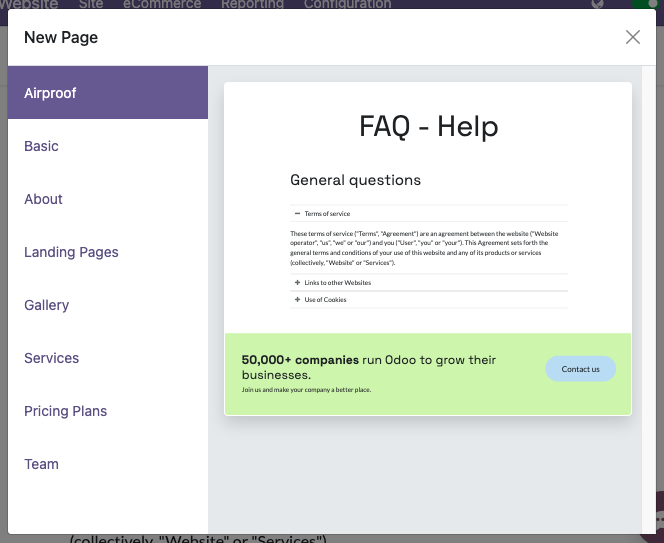
创建可从“新建页面”对话框窗口获取的预设静态页面模板。
宣言
页面模板必须通过 new_page_templates 和 new_page_template_templates.xml 定义到模块的 __manifest__.py 中:
/website_airproof/__manifest__.py¶{
'name': 'Airproof Theme',
'description': '...',
'category': 'Website/Theme',
'version': '19.0.0.0',
'author': '...',
'license': '...',
'depends': ['website'],
'data': [
# ...
'views/new_page_template_templates.xml'
],
'assets': {
# ...
},
'new_page_templates': {
'airproof': {
'faq': ['s_airproof_text_block_h1', 's_title', 's_faq_collapse', 's_call_to_action']
}
}
模板
然后,您必须使用基于 __manifest__.py 层次结构的特定命名约定来创建模板。在本例中,名称为 new_page_template_sections_airproof_faq。该模板中调用的构建块与标准构建块完全相同,除了第一个“动态”调整的构建块之外。
创建标准 s_text_block 的新实例(primary 属性很重要)并应用一些调整:
/website_airproof/views/new_page_template_templates.xml¶<template id="s_airproof_text_block_h1" inherit_id="website.s_text_block" primary="True">
<xpath expr="//div[hasclass('container')]|//div[hasclass('o_container_small')]" position="replace">
<div class="container s_allow_columns">
<h1 class="display-1">FAQ - Help</h1>
</div>
</xpath>
</template>
实例化页面模板的每个构建块(修改或未修改):
/website_airproof/views/new_page_template_templates.xml¶<template id="new_page_template_airproof_faq_s_text_block_h1" inherit_id="website_airproof.s_airproof_text_block_h1" primary="True" />
<template id="new_page_template_airproof_faq_s_title" inherit_id="website.s_title" primary="True" />
<template id="new_page_template_airproof_faq_s_faq_collapse" inherit_id="website.s_faq_collapse" primary="True" />
<template id="new_page_template_airproof_faq_s_call_to_action" inherit_id="website.s_call_to_action" primary="True" />
然后,按照上面的说明,在 #wrap 中创建包含一些 t-snippet-call 的页面模板:
/website_airproof/views/new_page_template_templates.xml¶<template id="new_page_template_sections_airproof_faq" name="Airproof - New Page Template FAQ">
<div id="wrap">
<t t-snippet-call="website_airproof.new_page_template_airproof_faq_s_text_block_h1" />
<t t-snippet-call="website_airproof.new_page_template_airproof_faq_s_title" />
<t t-snippet-call="website_airproof.new_page_template_airproof_faq_s_faq_collapse" />
<t t-snippet-call="website_airproof.new_page_template_airproof_faq_s_call_to_action" />
</div>
</template>
创建页面模板后,创建自定义组并将其添加到现有组中。下面是现有组的列表:
/website/views/new_page_template_templates.xml¶<template id="new_page_template_groups">
<div id="basic">Basic</div>
<div id="about">About</div>
<div id="landing">Landing Pages</div>
<div id="gallery">Gallery</div>
<div id="services">Services</div>
<div id="pricing">Pricing Plans</div>
<div id="team">Team</div>
</template>
请随意将自定义组添加到列表中:
/website_airproof/views/new_page_template_templates.xml¶<template id="new_page_template_groups" inherit_id="website.new_page_template_groups" name="Airproof - New Page Template Groups">
<xpath expr="//div[@id='custom']" position="after">
<div id="airproof">Airproof</div>
</xpath>
</template>